Update: Usability improvements

This update brings a set of small but meaningful improvements that make Deskroom more convenient and efficient to use.
Per-metric chart views in the summary dashboard
When you added multiple metrics to a summary dashboard, several charts were displayed at once, making it hard to grasp everything at a glance.
Now, when you select a metric in the summary dashboard, only the chart for that metric is shown. Even if you have many metrics registered, clicking the one you want to see lets you review just that data cleanly. Instead of spending time deciphering complex charts, you can focus directly on the metric you need.
Direct date entry in the date filter
You can now enter or edit dates directly. If you want to view data from January 2024, you can type the date in directly instead of flipping through the calendar twelve times. Choose whichever method you prefer—picking from the calendar or entering it directly.
Download the property list as a file
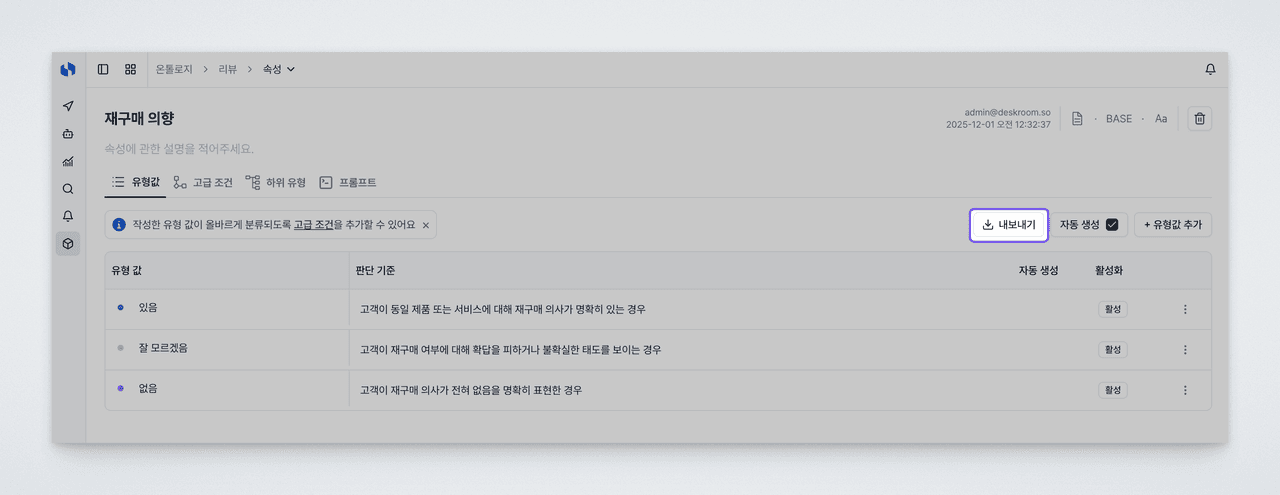
As your ontology grows more complex, the number of Base and Derived properties can climb into the dozens or more. It was not easy to review them one by one on screen to understand the overall structure or examine the relationships between properties.
Now you can download the property list as a file. In the downloaded file, you can compare and review property names, types, configured values, and more at a glance. This is useful when reviewing your ontology design, sharing the property structure with teammates for feedback, or working on documentation.
Reorder advanced property conditions by dragging
Advanced property conditions are evaluated in order from top to bottom. If the first condition matches, its value is applied; if not, evaluation moves to the next condition. Since the classification result can change depending on which condition you place first, order matters—but previously, changing the order meant deleting a condition and adding it again.
Now you can freely reorder advanced conditions with drag and drop. Adjusting condition priority or inserting a new condition in the middle is far more intuitive. When designing complex classification logic, you can reach the result you want more quickly.
Add multiple members to dashboard permissions at once
When adding members in dashboard permission management, you had to repeat the process of selecting and saving one person at a time. This was cumbersome when granting access to an entire team or sharing with several people at once.
Now you can select multiple members at once when adding them. Whether sharing a dashboard with a whole team or granting access to everyone involved in a project, you can finish the task in just a few clicks. This reduces the time spent on permission setup so you can focus more on your actual work.